Getting Started with your Benefits

Your First Few Weeks with RBA

Welcome to the Reformed Benefits Association family. You’re covered, and we’re glad you’re here.
This page is your starting point with your insurance plan. It will help you get set up and confident during your first few weeks of use.

Frequently Asked Questions

When you land on reformedbenefits.org, you’ll see “Login” at the top of each page — that’s bswift, your benefits enrollment portal. In the future, you’ll use it most often during open enrollment to make updates on plan selection and member information.

✓ Use bswift for ✗ Don’t use bswift for
Open enrollment Finding a doctor
Life event changes Checking claims
Updating dependents ID cards
Enrollment confirmation Prescriptions

How to Log In

  1. Go to reformedbenefits.org → click “Login”
  2. Username: first initial + last name (jsmith)
  3. First-time password: last 4 of your SSN
  4. Click “Forgot Password” if you need to reset

Your Benefits Guide is your go-to resource for understanding your coverage. It explains what’s covered, what it costs, how your deductible works, and what to expect when you need care. Keep it bookmarked — you’ll come back to it.

You can always find the current version right here. Follow this link, fill out the short form, and you’ll get the right guide for your plan:

Seeing an in-network provider keeps your costs down. The portal you use depends on your plan. Find your plan below, then follow the steps to search for providers in your area.


HMA

Your network: Priority Health PPO
Where to search: accesshma.com

Steps:

  1. Log in or create an account
  2. Click “Find a Provider”
  3. Search by location, specialty, or name

Traveling? Use the Cigna OAP network. Look for the Cigna logo on your ID card.

UMR

Your network: UHC Choice Plus
Where to search: umr.com

Steps:

  1. Log in or create an account
  2. Click “Find a Provider”
  3. Search by location, specialty, or name

Look for the heart icon — Premium Care Physicians meet quality and cost criteria.

Surest

Your network: UHC Choice Plus
Where to search: benefits.surest.com

Steps:

  1. Log in or download the app
  2. Search for your healthcare need
  3. Select “Find Providers”

See costs before you go — Surest shows copay amounts for each provider before you book.

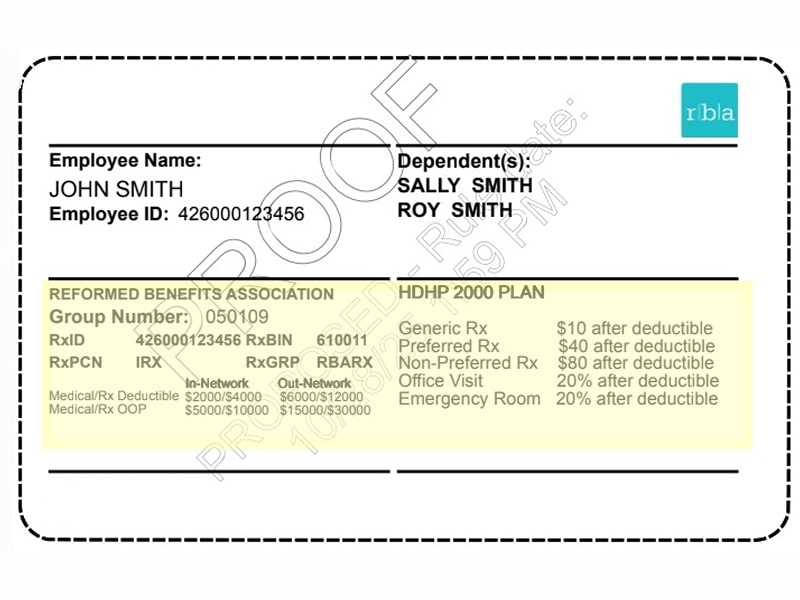
Your RBA ID card works at any participating pharmacy through OptumRx. No separate drug card needed.
Two ways to fill:

  • Retail — any participating pharmacy
  • Mail order — for medications you take regularly, delivered to your home (optumrx.com or 855-524-0381)Your RBA ID card works at any participating pharmacy. No separate drug card needed.

Note that your card will have important information that will provide you with the important details of your prescription coverage.


Sample RBA Rx card

Saving you money behind the scenes

RBA partners with RazorMetrics to automatically find lower-cost options on your prescriptions.

Here’s how it works: RazorMetrics looks at your prescription claims. If a cheaper alternative exists, like a generic or a better-priced option on your formulary, they contact your doctor. Your doctor reviews the recommendation and decides if it makes sense for you.

The great part — there’s nothing to sign up for. No extra apps, no additional forms.

Your ID card will arrive in the mail within a few weeks of enrolling. But you don’t have to wait — your coverage is active, and you can access a digital ID card right away.

Register with your carrier to view and download your card:

Plan Website
HMA accesshma.com
UMR umr.com
Surest benefits.surest.com

Note: It can take a few business days after enrollment for your information to appear on these sites.

Most of the time, you can only change your benefits during open enrollment. But if you experience a qualifying life event, you have 30 days to update your coverage.

Qualifying life events include:

  • Marriage or divorce
  • Birth or adoption of a child
  • Death of a spouse or dependent
  • Loss of other health coverage (such as a spouse’s plan)
  • Gaining other health coverage
  • Change in employment status (yours or a spouse’s)
  • Change in residence that affects your plan options
  • A dependent aging out of coverage

If one of these happens, contact the RBA benefits team within 30 days. We’ll help you make the changes you need.

Email: benefits@reformedbenefits.org Phone: 800.701.8992

Who do I contact with questions?

Claims, coverage, or finding providers

For help with specific claims, claim forms, or finding in-network care, contact your carrier directly. Many carriers also have a chat function in their app.

Plan Phone Website
HMA 833-865-0141 accesshma.com
UMR 844-600-0919 umr.com
Surest 866-683-6440 benefits.surest.com

Pharmacy — OptumRx: 855-524-0381 | optumrx.com

Dental — Delta Dental: 800-524-0149 | deltadental.com

Vision — EyeMed: 866-723-0513 | eyemed.com

Looking for more?

The member resource page is the place to go. You’ll find downloads, links to all the important providers and access to more detailed information for additional benefits your health plan provides.

General questions about your benefits?

Not sure where to start? The RBA benefits team can help with enrollment questions, plan questions, or anything you’re unsure about.

Email: benefits@reformedbenefits.org Phone: 800.701.8992 Hours: Monday – Friday, 8:30 a.m. – 5:00 p.m. ET